NDMU offers students access to technology in classrooms as well as in computer and social labs. Understanding that many students prefer to bring their own devices, we’ve created this guide to list the key hardware, accessories, and software recommended for those bringing technology to campus.
Personal Computer or Laptop
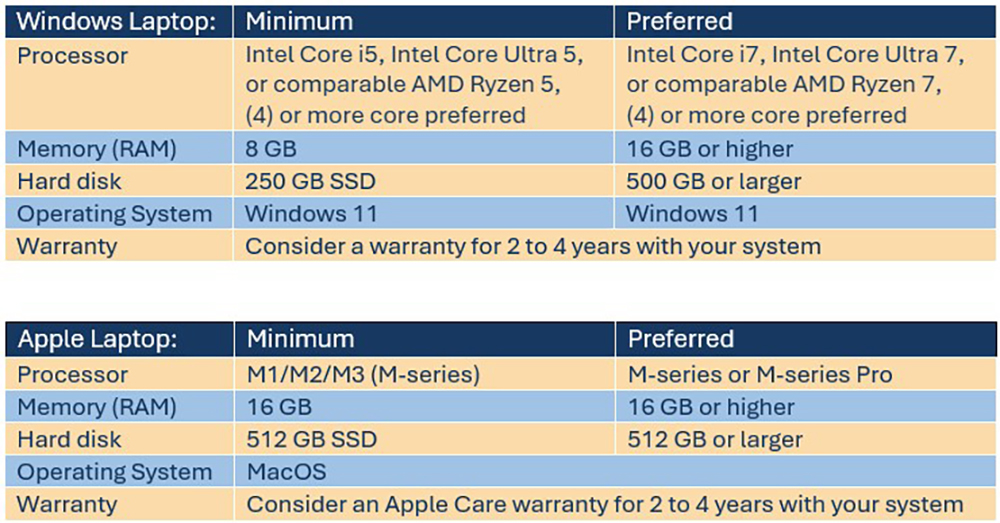
Having a dependable desktop or laptop computer is important for college, as most coursework and communication take place online. Chromebooks, iPads, tablets, and mobile phones are not recommended as primary devices for your coursework, because some required applications cannot run on them. Confirm with your intended program of study whether certain software applications require more advanced system specifications. Keep the following recommendations in mind when selecting your technology:
Software and Applications
- Office Suite: NDMU offers free access to Microsoft Office (M365) for students enrolled for the semester.
- Antivirus and Security: Install reputable antivirus software to protect your devices.
- Note-Taking Apps: Tools like OneNote (part of M365) can help organize class materials.
- Collaboration Tools: Familiarize yourself with platforms like Microsoft Teams used for group projects and virtual meetings
Smartphone
Most students rely on their smartphones for communication, campus navigation, and quick access to class schedules, emails, and university apps.
Headphones or Earbuds
Quality headphones or earbuds are useful for online lectures, studying in public spaces, and relaxing with music or podcasts. Consider noise-canceling options for added focus in busy environments.
External Storage
External hard drives and USB flash drives play a key role in backing up critical files, transferring work, and increasing storage capacity. Additionally, cloud storage services like OneDrive (part of M365) or Dropbox offer safe and remote access to your documents.
Printer (Optional)
NDMU offers printing services; however, having a compact printer in your dorm can be convenient for last-minute assignments. Keep in mind that Wi-Fi printing is prohibited in the residence halls.
Power Strips and Surge Protectors
Bring a surge protector with multiple outlets and USB ports to safely charge all your devices.
Ethernet Cable and Adapter
Although NDMU offers Wi-Fi, having an Ethernet cable can provide a more stable internet connection for online classes or gaming. Some laptops may require a USB-to-Ethernet adapter.
Calculator
Depending on your major, a scientific or graphing calculator may be required. Check your course requirements before purchasing one, as some exams may only allow specific models.
Other Useful Devices
- Tablet or E-reader: Ideal for reading digital textbooks, taking notes, or sketching diagrams.
- Portable Charger (Power Bank): Useful for keeping devices charged while on the go.
- Bluetooth Speaker: For personal enjoyment or group activities in your dorm.
- Webcam: If your laptop’s built-in camera isn’t high-quality, consider using an external webcam for virtual classes.
- USB Hub and cables:
What technology should I bring to campus as a new student?